Context
This is continuation from the 2 part post series on Show images in django admin -
- Part 1: Using readonly_fields ✅
- Part 2: Create custom widget for the field ✅
- Part 3: Create a Mixin to reuse the widget ❌
Problem
In Part 1 of this tutorial we saw how to use readonly_fields to show actual image but there are few cons with such
implementation -
- We do not have option to change the image from this field.
- We need to create method to return image tag for each field. So, the code is not scalable and doesn’t follow the DRY principle. Actually it’s quite opposite.
We will override the underlying widget provided by Django!
A widget is Django’s representation of an HTML input element. The widget handles the rendering of the HTML, and the extraction of data from a GET/POST dictionary that corresponds to the widget.
— Django site
Solution
🔨🔨🔨 Enough describing stuff, let’s get our hands dirty.
First let’s create a new widget which is subclassed from Django’s AdminFileWidget and override the render method which
is responsible for converting our widget to HTML code.
from django.contrib.admin.widgets import AdminFileWidget
from django.utils.safestring import mark_safe

class AdminImageWidget(AdminFileWidget):
    def render(self, name, value, attrs=None, renderer=None):
        output = []
        if value and getattr(value, "url", None):
            image_url = value.url
            file_name = str(value)
            output.append(
                '<a href="{}" target="_blank"><img src="{}" alt="{}" style="max-height: 200px;"/></a>'.
                    format(image_url, image_url, file_name))
        output.append(super().render(name, value, attrs))
        return mark_safe(u''.join(output))
Now to use this newly created widget we can override the formfield_overrides property of ModelAdmin and specify to
use this widget for the image fields -
@admin.register(models.User)
class UserAdmin(admin.ModelAdmin):
    readonly_fields = ('get_profile_pic_tag', )
    formfield_overrides = {
        ImageField: {'widget': AdminImageWidget},
    }
🚀 And this is the output -
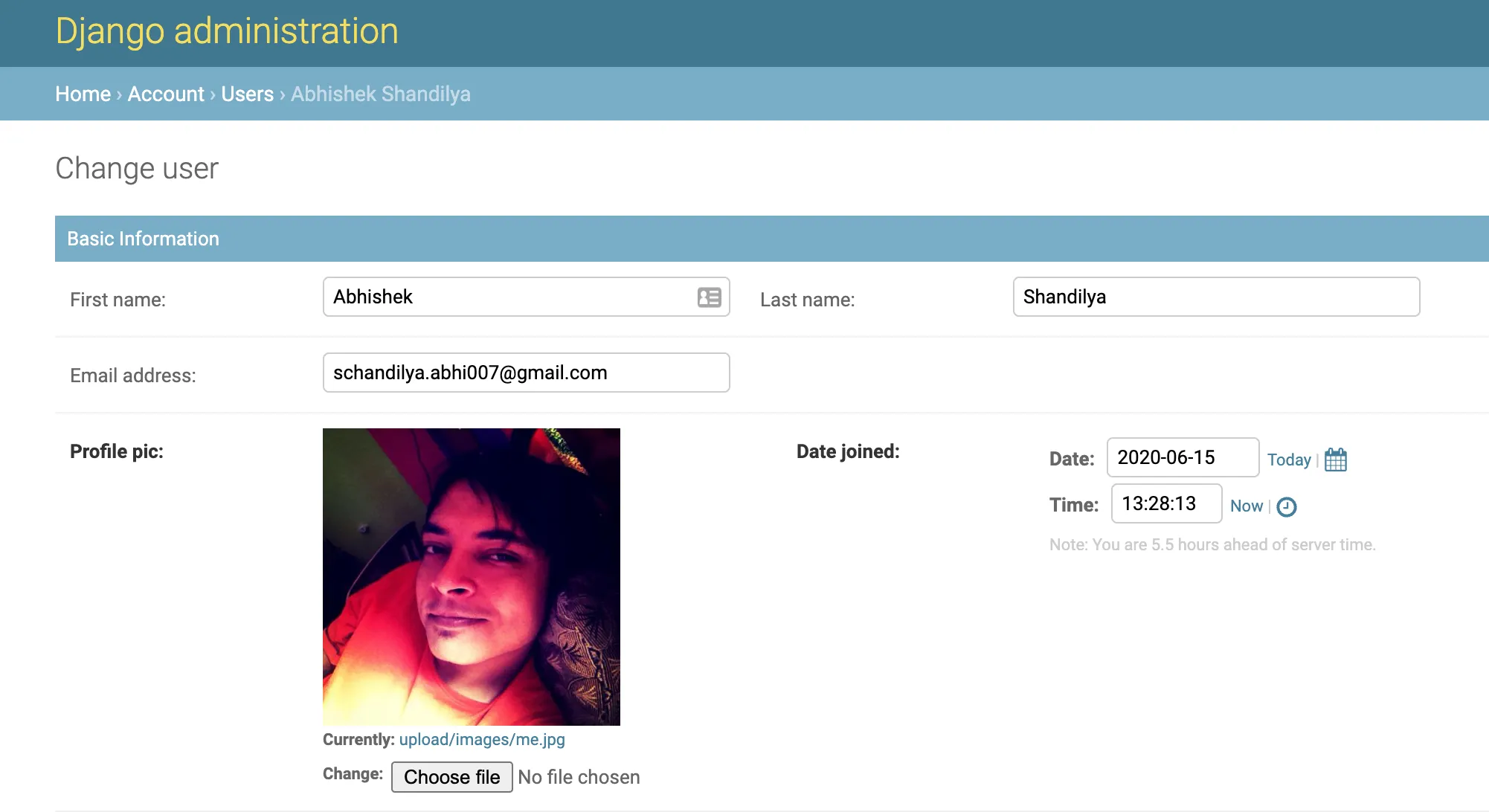
As we can see, the existing ImageField field profile_pic now shows the image preview and it can be changed as we
are not using the readonly field.
There is a caveat with this implementation. This method will show the preview for all the
ImageFieldtype of fields from the model.
To solve this issue we can override the formfield_for_dbfield method provided by ModelAdmin and apply
the widget to only the selected fields.
def formfield_for_dbfield(self, db_field, **kwargs):
    if db_field.name == 'profile_pic':  # Add check for other fields if required
        request = kwargs.pop("request", None)
        kwargs['widget'] = AdminImageWidget
        return db_field.formfield(**kwargs)
    return super().formfield_for_dbfield(db_field, **kwargs)
However, overriding the method for all the admin models could be cumbersome and our code will become messy. Also, this method doesn’t follow the DRY principle as mentioned earlier. In the next part of the tutorial we will see how we can reduce the complexity of the implementation and make our code follow the DRY approach.